Configure
Configure columns
Define CSVJetty output fields, automatic header aliases, data types, examples, select options, regex patterns, and custom validation rules.
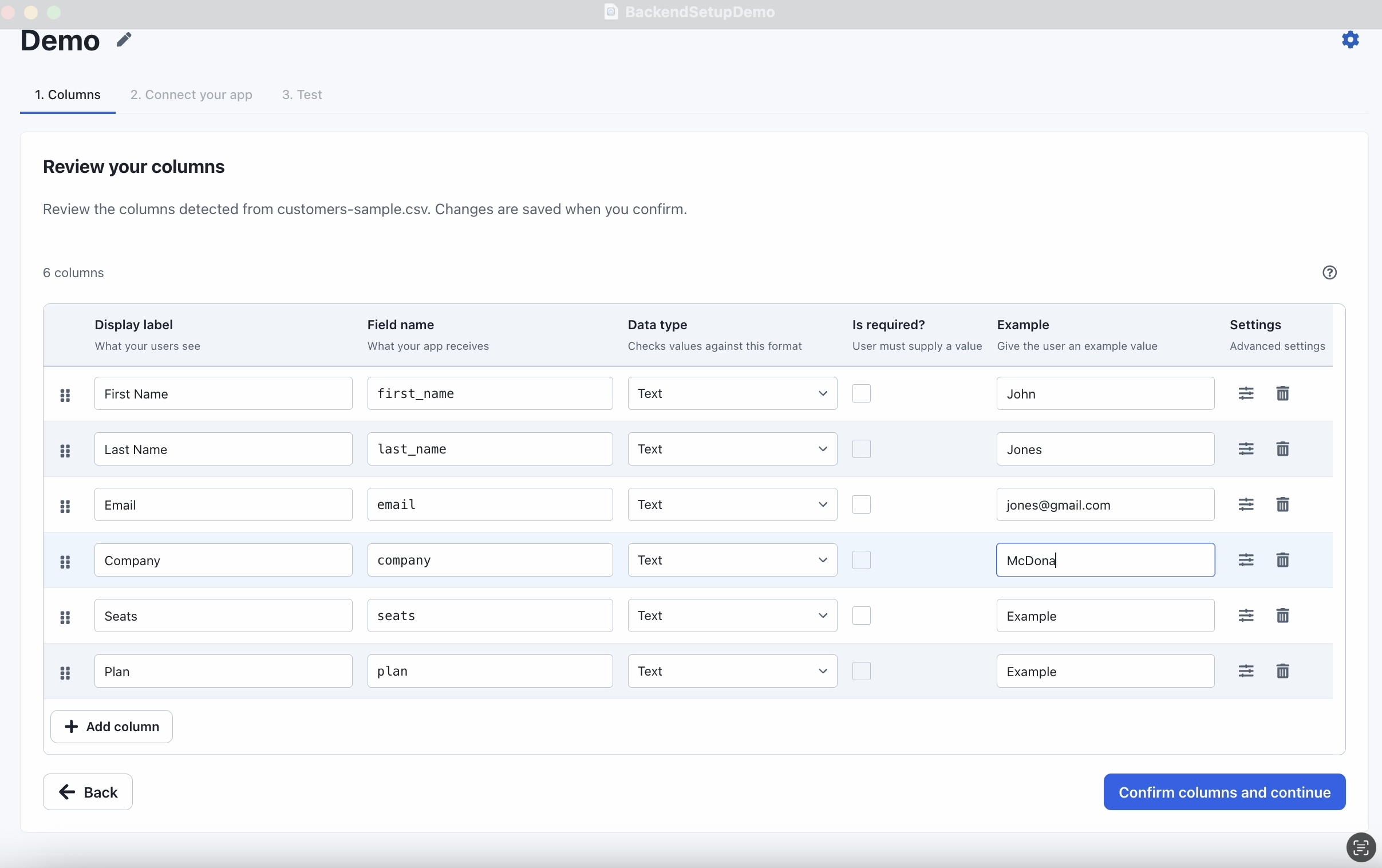
Columns define the records your application expects. CSVJetty uses them for header matching, validation, conversion, examples, and the keys in delivered records.
Configure in the dashboard or in code
Configure columns in the dashboard for the normal reusable importer setup. Pass a columns prop when you need to override that configuration for a particular import session. If you are deciding how fields relate to uploaded headers, start with Column mapping.
Column override example
<CSVJetty importerKey="YOUR_IMPORTER_KEY" columns={[ { name: "name", label: "Full name", type: "text", required: true, aliases: ["full_name", "contact_name"], example: "Ada Lovelace", }, { name: "email", label: "Email address", type: "email", required: true, validate(value) { if (!String(value || "").endsWith("@example.com")) { return "Use an example.com email address."; } }, }, ]} onData={async ({ rows }) => { console.log(rows); }}> Import contacts</CSVJetty>Code overrides the dashboard
Column properties
| Property | Purpose |
|---|---|
name | Unique output key. Starts with a letter and may contain letters, digits, or underscores; up to 50 characters. |
label | Human-readable field label shown to the person importing data. |
type | Validation and conversion type. |
required | Requires a column match and a nonempty value. |
aliases | Alternative uploaded header names used for automatic matching. |
options | Allowed values for select fields. |
pattern | Regular expression used by regex fields. |
example | Example value shown to help the importer understand the expected data. |
description | Additional guidance about the field. |
validate(value, record) | Synchronous custom validator that runs in your application. |
Field types
CSVJetty supports these built-in field types:
- text
- number
- date
- select
- phone
- url
- currency
- boolean
- regex
Dates use YYYY-MM-DD. Valid number and currency values are delivered as JavaScript numbers. Valid boolean values are delivered as booleans.
Custom validation
A custom validator receives the current value and the full record. Return an error string or false when the value is invalid. Return nothing when it is valid.
JS
{ name: "email", label: "Email", type: "email", validate(value, record) { if (record.status === "active" && !value) { return "Email is required for active contacts."; } },}Validators are synchronous
Invalid row behavior
Importer settings determine what users can do when CSVJetty finds invalid values. See Validation and corrections for the overall model and Importer settings for the controls.
- Skip invalid rows excludes invalid rows from delivery.
- Require valid rows blocks the import until every row is valid.
- If both settings are disabled, users can choose to import values that still fail validation.
Always validate incoming records again on your server before persisting them.