Validate CSV data and let users correct errors
Validate required fields, email addresses, and numbers in CSV uploads, then let users correct invalid cells before delivery.
View as MarkdownStart with the records your app needs
A file can be valid CSV and still contain unusable data. An email column might contain a sentence; a required name might be empty. Configure destination fields so those problems appear during review.
Create an importer in the CSVJetty dashboard, select callback delivery, and copy its importer key. Replace YOUR_IMPORTER_KEY in the examples with that key.
Enable Require valid rows in the dashboard for this guide. The example defines required name, email, and seats fields, plus a custom rule that seats must be a positive whole number.
npm install csvjettyAdd field types and a custom validator
import CSVJetty from "csvjetty";

const columns = [
  { name: "name", label: "Full name", type: "text", required: true },
  { name: "email", label: "Email", type: "email", required: true },
  {
    name: "seats", label: "Seats", type: "number", required: true,
    validate(value) {
      const number = Number(value);
      if (!Number.isInteger(number) || number < 1) {
        return "Enter a whole number of seats greater than zero.";
      }
    },
  },
];

export default function CustomerImport() {
  return (
    <CSVJetty
      importerKey="YOUR_IMPORTER_KEY"
      columns={columns}
      onData={({ rows }) => console.log(rows)}
    >
      Import customers
    </CSVJetty>
  );
}
Passing columns replaces saved dashboard fields for this session. The custom validator returns an error message for invalid values and returns nothing for valid values. Custom validators run synchronously in the application.
Upload and correct invalid values
Download customers-validation.csv →
Full name,Email,Seats
Ada Lovelace,ada@example.com,3
Grace Hopper,not-an-email,0
Katherine Johnson,katherine@example.com,2
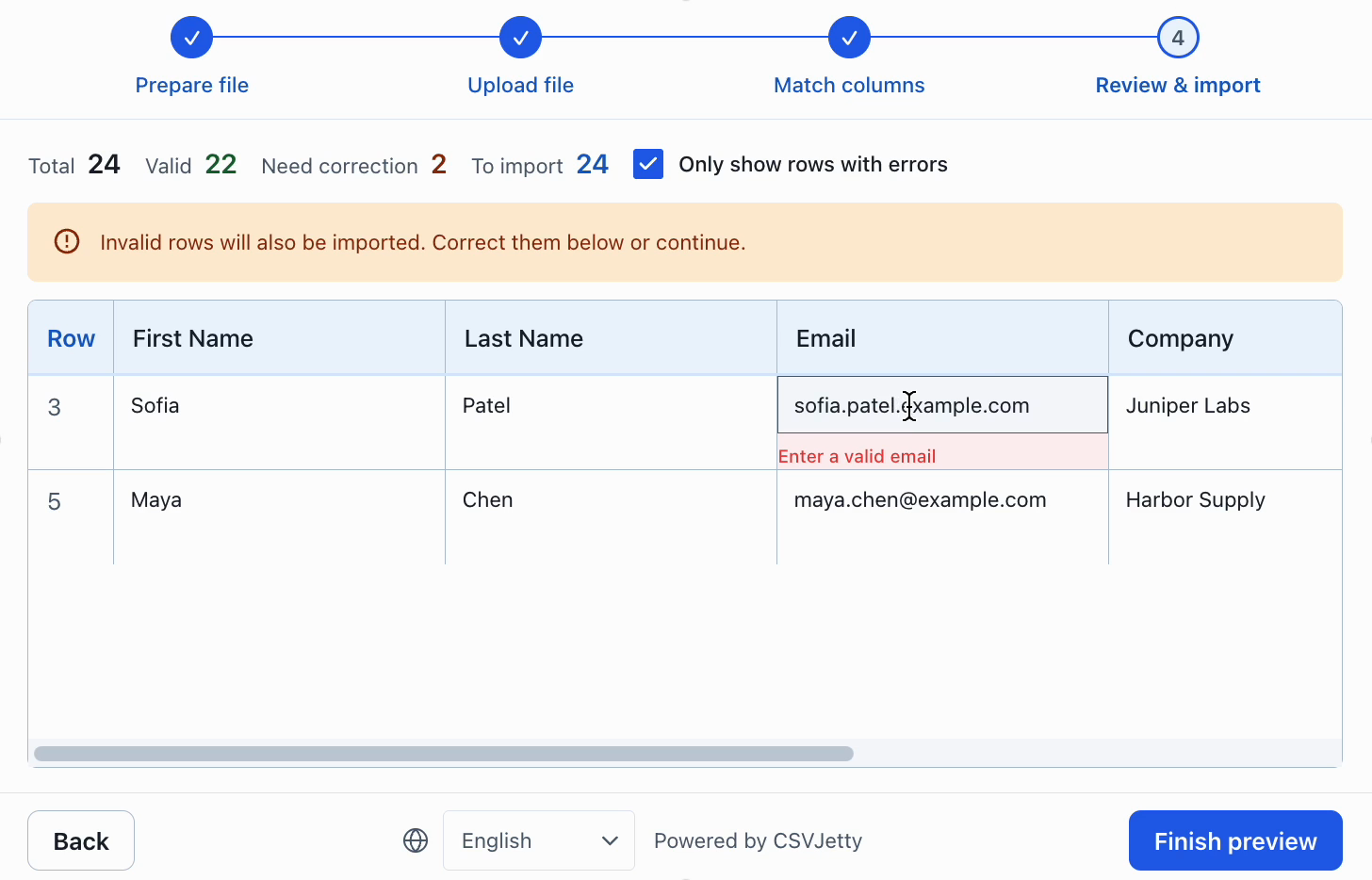
Review the column mappings. The second data row has an invalid email and an invalid seat count. Change them to grace@example.com and 1 during review, then complete the import. Inspect the browser console for the delivered records. Valid number fields are delivered as JavaScript numbers.
Choose what happens to invalid rows
| Setting | Behavior |
|---|---|
| Require valid rows | Blocks import while any row is invalid. |
| Skip invalid rows | Excludes invalid rows from delivery. |
| Neither enabled | Allows users to continue with values that still fail validation. |
Choose the behavior according to your application. For this walkthrough, use Require valid rows and leave Skip invalid rows disabled so users must correct the sample errors.
Check business rules on the server
Client validation helps users correct their files. Your server must still authenticate requests, enforce permissions, and validate submitted records. Database checks such as an existing email address belong on the server.
In callback delivery, return row errors using the original CSV row numbers supplied in rowNumbers. The example below rejects the second data row, not the second element of an arbitrary delivery batch.
{
  "errors": [
    { "row": 2, "message": "Email already exists." }
  ]
}
If an entire batch cannot be saved, throw from onData. Make database writes idempotent using importId and original row identity.
Apply checks to real import workflows
Contact imports need a normalized email rule plus database uniqueness. Product imports need text SKUs, decimal-price rules and whole-number stock. Synchronous browser checks help customers correct data, while database constraints enforce the final write even if the interface is bypassed.
Build your importer
Configure the fields your app expects, then connect CSVJetty to your application.
Create an importer →